
Implementing SLSA Level 3 with GitHub Actions, Go, and Sigstore
Stop build-server attacks where code scanners fail. This is a complete, practical guide to implementing and verifying SLSA Level 3 for your Go applications using GitHub Actions and Sigstore. Generate non-falsifiable provenance and build the verifier to enforce it.
Ouça este artigo
Implementing SLSA Level 3 with GitHub Actions, Go, and Sigstore
Introduction
You've just received a critical security alert. A popular open-source library your team relies on has been compromised. The attacker didn't exploit a vulnerability in the code; they compromised the project's build server and injected malicious code directly into the published artifact. Your scanners didn't catch it because the source code in Git looks clean. Your team is now scrambling to identify every system running the compromised binary. This isn't a theoretical scenario; it's the anatomy of modern software supply chain attacks like the SolarWinds or Codecov breaches.
In an era where CI/CD pipelines are the factories of our digital infrastructure, securing the assembly line itself is no longer optional. This is where the Supply-chain Levels for Software Artifacts (SLSA) framework comes in. It's a security framework designed to prevent tampering, improve integrity, and secure the packages and infrastructure in your projects. We're not just talking about theory; we're talking about achieving SLSA Level 3, which provides strong, non-falsifiable guarantees about how your software was built.
This article is a deep dive for experienced engineers on how to implement and verify SLSA Level 3+ build attestations in modern CI/CD pipelines like GitHub Actions. You will learn:
- The practical difference between SLSA levels and what SLSA v1.0 means for your build process.
- How to architect a SLSA L3 compliant build pipeline using isolated, ephemeral builders.
- A complete, production-ready implementation in GitHub Actions for building and attesting a Go application.
- How to write a verification service to programmatically enforce policies based on SLSA provenance before deployment.
What is SLSA? / What changed?
SLSA (Supply-chain Levels for Software Artifacts) is not a tool or a specific product, but a check-list of standards and controls to ensure the integrity of a software artifact through its supply chain. It was created by Google and is now stewarded by the Open Source Security Foundation (OpenSSF).
Historically, "securing the build" meant running static analysis (SAST) and software composition analysis (SCA) tools. These are crucial but incomplete. They check the source code for vulnerabilities but do nothing to guarantee that the final binary you deploy actually came from that specific source code and was built in a secure, trusted environment. SLSA fills this gap by focusing on provenance—a verifiable record of how an artifact was created.
The core of SLSA is its leveling system, which provides a path for incremental security improvements. With the formalization of the SLSA v1.0 specification in June 2023, the levels have become more concrete and are now defined across different "tracks" like Build, Source, and Dependencies Source: slsa.dev, "SLSA v1.0 is here!". For this guide, we're focusing on the Build Track.
Here’s a practical breakdown of the key levels:
- SLSA Level 1: Requires a documented build process that is automated. Most CI/CD pipelines meet this by just existing.
- SLSA Level 2: Requires the build service to generate authenticated provenance. This means the provenance is signed, proving it came from the build platform (e.g., GitHub Actions). However, the build steps themselves could still be tampered with by a project maintainer with write access to the pipeline configuration.
- SLSA Level 3: This is the significant jump. It requires the build to run in an isolated and ephemeral environment and for the provenance to be generated by a trusted and isolated service, separate from the user-controlled build steps. This prevents a user with commit access from easily manipulating the build process to forge provenance. The provenance is non-falsifiable.
- SLSA Level 4: The highest level, requiring a two-person review of all changes and a hermetic, reproducible build. This is currently very difficult to achieve for most projects.
The main driver for developer discussion today is the accessibility of SLSA Level 3. Previously, it was a standard only achievable by hyperscalers with bespoke internal build systems. Now, platforms like GitHub Actions provide the necessary primitives (reusable workflows, OIDC authentication) to make L3 a tangible goal for any organization.
Technical Aspects
Achieving SLSA Level 3 hinges on a specific architectural pattern: isolating the "trusted builder" from the user-defined build logic.
Architecture: The Trusted Reusable Workflow
In a typical CI/CD pipeline, the pipeline configuration file (.github/workflows/build.yml) defines the entire process. A user with write access to the repository can modify this file, change build flags, or inject malicious steps.
To achieve SLSA L3, we decouple the process:
- User-Controlled Workflow (
build.yml): This workflow is minimal. It checks out the code and then calls a separate, trusted, and non-modifiable workflow. It passes parameters like the path to the code or the desired Go version. - Trusted Reusable Workflow (
slsa-generator.yml): This is the core of the L3 guarantee. It's a reusable workflow maintained by a trusted entity (e.g., the OpenSSF or your organization's security team). This workflow cannot be modified by the calling repository. - Isolation: The reusable workflow runs in a separate, ephemeral environment. It fetches the source code based on the trigger context (e.g., the git commit SHA).
- Provenance Generation: The trusted workflow performs the build and then generates a signed
in-totoattestation. This attestation—the provenance—is a detailed JSON document describing exactly what source materials went into the build, what commands were run, and what artifacts were produced. - Keyless Signing (Sigstore): The provenance is signed using short-lived certificates obtained via OIDC from the build platform. This "keyless" approach avoids the need to manage and protect long-lived signing keys. The signature and certificate are logged in a public transparency log (Rekor).
- Artifact and Attestation Storage: The final artifact (e.g., a binary or container image) and its corresponding
.intoto.jsonlattestation file are uploaded to a release or registry.
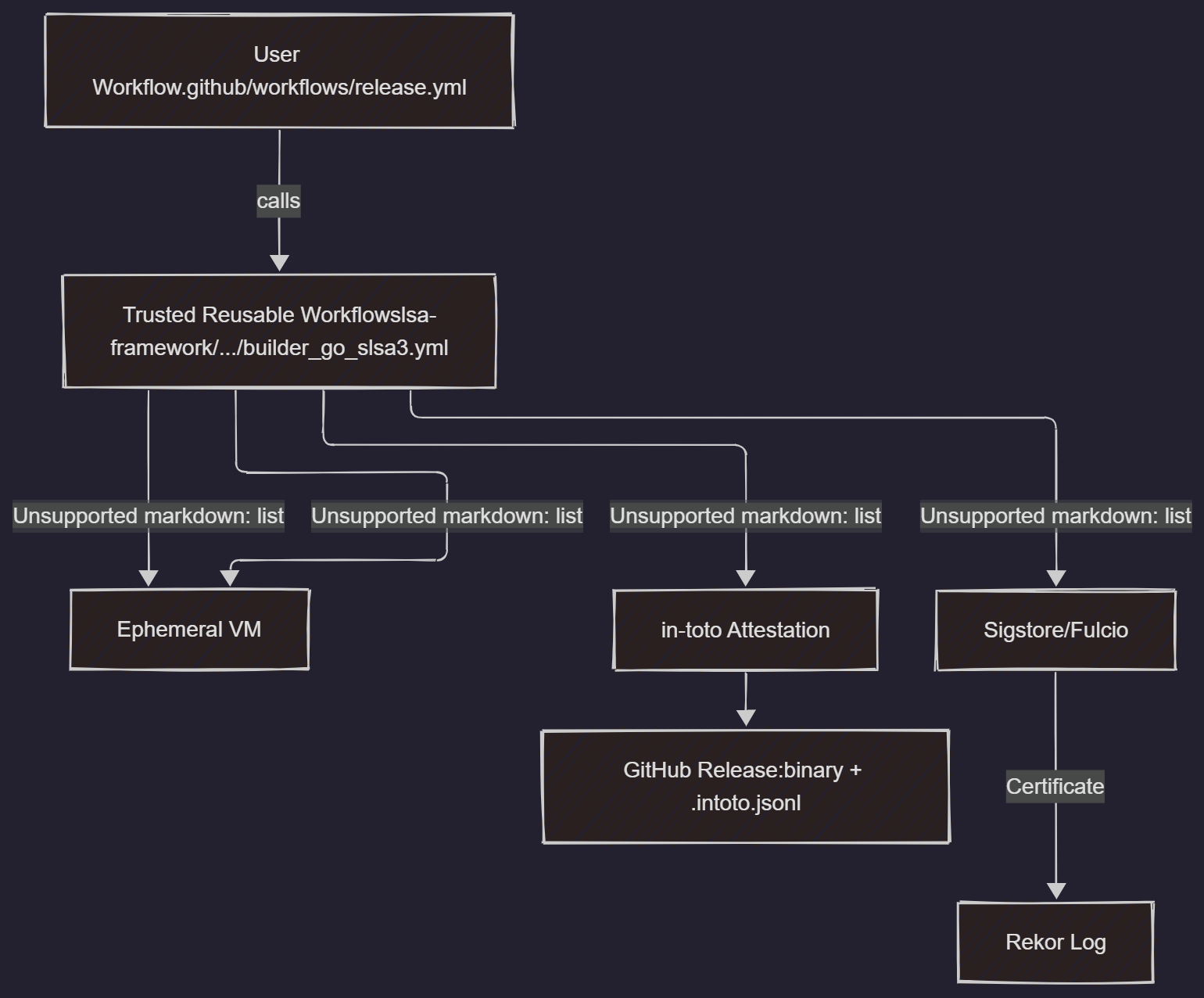 Image Source: slsa.dev
The in-toto Attestation Format
The generated provenance is not just a simple signature. It's a structured in-toto attestation with a SLSA predicate. Let's break down a real example:
{
  "_type": "https://in-toto.io/Statement/v0.1",
  "subject": [
    {
      "name": "my-app",
      "digest": {
        "sha256": "a4f8b9a1b2c3d4e5f6a7b8c9d0e1f2a3b4c5d6e7f8a9b0c1d2e3f4a5b6c7d8e9"
      }
    }
  ],
  "predicateType": "https://slsa.dev/provenance/v0.2",
  "predicate": {
    "builder": {
      "id": "https://github.com/slsa-framework/slsa-github-generator/.github/workflows/builder_go_slsa3.yml@refs/tags/v1.9.0"
    },
    "buildType": "https://github.com/slsa-framework/slsa-github-generator/go@v1",
    "invocation": { ... },
    "buildConfig": { ... },
    "metadata": {
      "buildInvocationId": "4a5b6c...",
      "completeness": { ... }
    },
    "materials": [
      {
        "uri": "git+https://github.com/my-org/my-repo@refs/tags/v1.0.0",
        "digest": {
          "sha1": "abcdef1234567890abcdef1234567890abcdef12"
        }
      }
    ]
  }
}
Key fields for verification:
subject: An array of artifacts produced by the build. Thedigestis the cryptographic hash of the artifact. This is what links the provenance to the binary.predicate.builder.id: The unique, verifiable identity of the trusted builder workflow. For GitHub Actions, this is the repository, path to the workflow, and the git ref (@refs/tags/v1.9.0). This is the core of the trust model.predicate.materials: The source code used for the build. It includes the repository URL and the exact commit SHA. This proves the binary came from a specific version of the source.
In Practice
Let's implement a full SLSA Level 3 build and verification pipeline for a simple Go application.
Use Case: Building and Attesting a Go CLI Tool
Our goal is to build a Go binary, generate SLSA L3 provenance for it, and then run a separate verification script that decides if the binary is safe to "deploy" based on its provenance.
Prerequisites:
- A GitHub repository containing a simple Go application.
- Familiarity with GitHub Actions syntax.
Directory Structure:
.
├── .github/
│   └── workflows/
│       └── release.yml
└── main.go
main.go:
package main

import "fmt"

func main() {
    fmt.Println("Hello, SLSA-secured world!")
}
Step 1: The GitHub Actions Release Workflow
Create .github/workflows/release.yml. This workflow triggers on a tag, sets up Go, and then calls the trusted SLSA generator.
.github/workflows/release.yml
# This workflow is a wrapper around the SLSA Go generator.
# It is designed to be triggered on a new tag push.
#
# v1.0.0
name: SLSA Build and Attest

on:
  push:
    tags:
      - 'v*.*.*'

permissions:
  contents: read # To checkout the repository
  id-token: write # Needed for sigstore OIDC authentication
  actions: read # To read workflow inputs

jobs:
  # This is a user-controlled job.
  # We delegate the actual build and attestation to a trusted, reusable workflow.
  call-slsa-builder:
    permissions:
      contents: write # To upload assets to a release
      id-token: write # For OIDC authentication with Sigstore
      attestations: write # To upload attestations to the GitHub attestation store
    uses: slsa-framework/slsa-github-generator/.github/workflows/builder_go_slsa3.yml@v1.9.0
    with:
      go-version: 1.21
      # The binary name can be customized here.
      # Default is the repository name.
      artifact-name: my-go-app
      # The directory where the main package is located.
      # Default is the root of the repository.
      directory: ./

  # Optional: Create a release to host the artifacts
  # This step runs AFTER the slsa-builder job has successfully completed.
  create-release:
    needs: [call-slsa-builder]
    runs-on: ubuntu-latest
    permissions:
      contents: write # To create the release
    steps:
      - name: Create GitHub Release
        env:
          GH_TOKEN: ${{ github.token }}
          # Get the tag name from the trigger event.
          TAG_NAME: ${{ github.ref_name }}
        run: |
          echo "Creating release for tag $TAG_NAME"
          gh release create "$TAG_NAME" \
            --generate-notes \
            --title "Release $TAG_NAME"

      - name: Download all workflow artifacts
        uses: actions/download-artifact@v4

      - name: Unpack artifacts
        run: |
          # The SLSA generator uploads artifacts in a specific format.
          # We need to find the binary and its attestation.
          ls -R
          # The artifacts are in a directory named after the artifact-name from the builder job.
          # Let's move them to the top level for easier upload.
          find my-go-app/ -type f -exec mv {} . \;

      - name: Upload assets to release
        env:
          GH_TOKEN: ${{ github.token }}
          TAG_NAME: ${{ github.ref_name }}
        run: |
          # Upload the binary and its attestation file.
          gh release upload "$TAG_NAME" my-go-app*
          gh release upload "$TAG_NAME" *.intoto.jsonl
How it works:
- Trigger: The workflow runs when you push a new tag (e.g.,
v1.0.0). - Permissions: Crucially, it requests
id-token: writewhich allows the job to get a OIDC token from GitHub. This token proves the job's identity to external services like Sigstore's Fulcio CA. uses:block: The magic happens here. We callslsa-framework/slsa-github-generator/.github/workflows/builder_go_slsa3.yml@v1.9.0. This is a specific, versioned, reusable workflow. We cannot change its internal steps from ourrelease.yml. This provides the isolation guarantee for SLSA L3.with:block: We pass parameters to the builder, like the Go version and the desired binary name.- Release Creation: The second job is optional but good practice. It creates a GitHub Release and attaches the generated binary and the
*.intoto.jsonlprovenance file.
Commit this file, tag a release, and push:
git add .github/workflows/release.yml main.go
git commit -m "feat: Add SLSA L3 build workflow"
git tag v1.0.0
git push && git push --tags
You will see a successful Actions run that produces two key files: my-go-app and my-go-app.intoto.jsonl.
Step 2: Verification
Generating provenance is useless without verifying it. A consumer of your software (or your own deployment pipeline) must verify the attestation before trusting the artifact. We'll use the official slsa-verifier tool for this.
Let's write a Go program that acts as a policy enforcement point.
verify.go:
package main

import (
	"context"
	"fmt"
	"log"
	"os"

	"github.com/slsa-framework/slsa-verifier/v2/verifiers"
	"github.com/slsa-framework/slsa-verifier/v2/verifiers/utils"
)

const (
	// The trusted builder ID we expect for our project.
	// This MUST match the `builder.id` in the provenance.
	trustedBuilderID = "https://github.com/slsa-framework/slsa-github-generator/.github/workflows/builder_go_slsa3.yml@refs/tags/v1.9.0"
	// The expected source repository.
	expectedSourceURI = "github.com/YOUR_ORG/YOUR_REPO"
)

func main() {
	if len(os.Args) != 3 {
		log.Fatalf("Usage: %s <path/to/binary> <path/to/provenance.intoto.jsonl>", os.Args[0])
	}
	binaryPath := os.Args[1]
	provenancePath := os.Args[2]

	log.Printf("Verifying artifact '%s' with provenance '%s'\n", binaryPath, provenancePath)

	// Read the provenance file.
	provenanceBytes, err := os.ReadFile(provenancePath)
	if err != nil {
		log.Fatalf("FATAL: failed to read provenance file: %v", err)
	}

	// Create builder options for verification.
	// This tells the verifier which builders we trust.
	builderOpts, err := utils.MakeBuilderOpts(trustedBuilderID)
	if err != nil {
		log.Fatalf("FATAL: failed to create builder options: %v", err)
	}

	// Create verification options. This includes setting the expected source repo.
	// The `BuildType` is specific to the generator used.
	verificationOpts := verifiers.DefaultProvenanceOpts(expectedSourceURI)
	verificationOpts.BuildType = "https://github.com/slsa-framework/slsa-github-generator/go@v1"


	// Run the verification.
	// This function does everything:
	// 1. Verifies the signature on the attestation against Sigstore's public-good instance.
	// 2. Checks that the artifact hash matches the subject in the provenance.
	// 3. Validates the contents of the provenance against our options.
	_, _, err = verifiers.VerifyArtifact(context.Background(), binaryPath, provenanceBytes, builderOpts, verificationOpts)
	if err != nil {
		// Verification failed! Do not trust the artifact.
		log.Fatalf("VERIFICATION FAILED: %v", err)
	}

	// If we reach here, the verification was successful.
	log.Println("✅ VERIFICATION SUCCESSFUL!")
	log.Printf("Artifact '%s' has valid SLSA L3 provenance from a trusted builder.", binaryPath)
}
Setup and Run:
- Initialize a Go module for the verifier:
go mod init verifier go get github.com/slsa-framework/slsa-verifier/v2@v2.4.1 - Download your artifact (
my-go-app) and its attestation (my-go-app.intoto.jsonl) from the GitHub release. - Update
expectedSourceURIinverify.goto match your repository (e.g.,github.com/my-org/my-app). - Run the verifier:
go run . ./my-go-app ./my-go-app.intoto.jsonl
Expected Output (Success):
2024/05/20 10:30:00 Verifying artifact './my-go-app' with provenance './my-go-app.intoto.jsonl'
2024/05/20 10:30:01 ✅ VERIFICATION SUCCESSFUL!
2024/05/20 10:30:01 Artifact './my-go-app' has valid SLSA L3 provenance from a trusted builder.
Now, try to tamper with the binary and see it fail:
echo "tampered" >> ./my-go-app
go run . ./my-go-app ./my-go-app.intoto.jsonl
Expected Output (Failure):
2024/05/20 10:32:00 Verifying artifact './my-go-app' with provenance './my-go-app.intoto.jsonl'
2024/05/20 10:32:01 VERIFICATION FAILED: slsa: artifact hash does not match subject digest
exit status 1
This demonstrates the end-to-end flow: a verifiable link between your source code and the final binary, enforced by a cryptographic guarantee.
Production Concerns
Security
- Trusted Builder Management: The
trustedBuilderIDis the root of trust. Hardcoding it in a script is fine for a demo, but in production, this should come from a secure configuration store. An attacker who can change your list of trusted builders can bypass the entire system. - Source URI Verification: Always verify the
expectedSourceURI. This prevents an attacker from using your trusted builder to build their own malicious code and passing it off as yours. - Self-hosted Runners vs. GitHub-hosted: Using GitHub-hosted runners is currently required for the official SLSA generator to provide L3 guarantees. If you use self-hosted runners, you are responsible for proving their isolation and ephemerality, which is a significant operational burden. You would also need to run your own instance of the builder workflow.
- Secrets Management: The keyless signing via OIDC is a huge security win. It removes the need to store and manage
SIGNING_KEYsecrets in your CI/CD platform, which are a prime target for attackers.
Error Handling
- CI Pipeline: If the SLSA attestation step fails, the entire workflow must fail. Do not allow a build to succeed without its corresponding provenance.
- Verification/Deployment: If provenance verification fails, the deployment must be blocked. This is a critical policy enforcement gate. Your deployment system (e.g., ArgoCD, Spinnaker, custom scripts) should integrate the verifier as a mandatory pre-deployment step.
- Transparency Log Unavailability: The verification process may query Rekor (the public transparency log). While highly available, it's an external dependency. Production verifiers should have retry logic with exponential backoff for network-related failures.
Observability
- Logging: Log every verification attempt, especially failures. Log the artifact name, digest, and the reason for failure (e.g., "invalid signature", "untrusted builder", "source mismatch").
- Metrics: Instrument your deployment pipeline to emit metrics. Good examples include:
deployments.verified.success_totaldeployments.verified.failure_total(with areasonlabel)deployments.unverified_total(to catch artifacts slipping through without provenance)
- Alerting: Create alerts for any verification failure in a production deployment pipeline. This is a high-signal event that could indicate a misconfiguration or an active attack.
Performance
- Build-time Latency: The SLSA generation step adds a small overhead. For a medium-sized Go project, this is typically 30-60 seconds on top of the compilation time. This is a negligible cost for the security benefit.
- Verification Latency: Verification is fast. It involves a hash calculation and a few network calls to the public Sigstore infrastructure. It's typically sub-second and unlikely to be a bottleneck in most deployment pipelines.
Cost
- CI/CD Minutes: The additional build time consumes more CI/CD minutes, which can be a factor for large teams on usage-based plans.
- Storage: Attestation files are small (a few KB). Storing them alongside artifacts in a registry or object store has a minimal cost.
- Sigstore: The public-good instance of Sigstore is free to use. If your organization has compliance requirements that preclude using a public service, you can self-host Sigstore, which incurs infrastructure and maintenance costs.
Limitations
- Not a Vulnerability Scanner: SLSA only attests to the process of the build. It does not scan your code or dependencies for vulnerabilities. It is a complement to, not a replacement for, SAST and SCA tools like Snyk or Trivy.
- Ecosystem Maturity: While support for Go, containers, and generic artifacts is strong, native SLSA generators for every language and build system (e.g., Maven, Cargo, NPM) are at varying levels of maturity. The
slsa-github-generatorprovides a generic builder, but it may not be as tightly integrated. - Bootstrapping Trust: The entire model relies on trusting the initial builder ID and the verifier itself. Securing these initial trust anchors is paramount.
Is It Worth It?
Objective Pros:
- High-Fidelity Tamper Detection: Provides strong, cryptographic proof that the artifact you are deploying matches the source code you reviewed.
- Defense Against Build-Level Attacks: Directly mitigates attacks where the CI/CD environment itself is the target.
- Regulatory Compliance: Helps meet emerging requirements for software supply chain security, such as those in the US Executive Order on Improving the Nation's Cybersecurity (14028).
- Increased Consumer Trust: For open-source projects, providing SLSA attestations allows consumers to independently verify the integrity of your releases.
Objective Cons:
- Implementation Overhead: Requires modifying CI/CD pipelines and setting up a verification gate. While the GitHub generator simplifies this, it's not a zero-effort change.
- Platform Lock-in (at L3): Achieving SLSA Level 3 is currently easiest on GitHub Actions due to the
slsa-framework's blessed reusable workflow. Replicating this on other platforms like GitLab CI or Jenkins requires more manual effort to prove the isolation properties of the builder. - Learning Curve: Understanding the concepts of
in-toto, Sigstore, and trusted builders requires an initial investment in learning.
When to Use vs. When to Avoid:
- Use It: For any externally distributed software, critical internal services, open-source projects, or systems subject to regulatory scrutiny. The security benefits are immense.
- Consider Avoiding It (with caution): For early-stage internal prototypes or non-critical applications where the risk of a supply chain attack is deemed acceptably low and engineering velocity is the absolute top priority. This is a risk-based decision that should be made consciously.
The developer experience on GitHub Actions is excellent. The slsa-github-generator abstracts away almost all the complexity. The estimated ROI is difficult to quantify but should be framed in terms of risk reduction. The cost of a single supply chain breach—in terms of incident response, reputational damage, and customer loss—can easily run into the millions, far outweighing the engineering cost of implementing SLSA.
Conclusion
Software supply chain security is no longer a niche discipline. Adopting frameworks like SLSA is becoming a baseline expectation for professional software engineering. By focusing on verifiable build provenance, we can close a critical gap that traditional security tools leave open.
Here are the key takeaways:
- SLSA Provides Provenance: It creates a verifiable link between your source code and the final artifact, ensuring the integrity of the build process.
- Level 3 is Now Accessible: Thanks to tooling like the
slsa-github-generatorand platforms like GitHub Actions, achieving the high security guarantee of non-falsifiable provenance is practical for many teams. - Generation is Only Half the Battle: You must implement verification at your deployment gates. An unverified attestation is just a signed piece of metadata; a verified attestation is a powerful security control.
- SLSA is Part of a Larger Strategy: Combine SLSA with SAST, SCA, and code signing to build a comprehensive, defense-in-depth security posture for your software supply chain.
As your next step, identify a critical application in your organization and implement the GitHub Actions workflow detailed in this guide. Set up a verification step in its deployment process. The hands-on experience will solidify your understanding and pave the way for a broader rollout. The ecosystem is rapidly evolving, and we can expect even tighter integration of SLSA and in-toto attestations into container registries, Kubernetes, and other cloud-native technologies, making this a foundational skill for the modern staff engineer.
Resources
- Official SLSA Specification: https://slsa.dev/spec/v1.0/
- SLSA GitHub Generator Repository: https://github.com/slsa-framework/slsa-github-generator (Highly active, the primary tool for GitHub Actions)
- SLSA Verifier Repository: https://github.com/slsa-framework/slsa-verifier (The official tool for verifying SLSA provenance)
- Sigstore Documentation: https://docs.sigstore.dev/ (The keyless signing infrastructure that underpins many SLSA implementations)
- in-toto Attestation Framework: https://in-toto.io/ (The specification for the attestation format used by SLSA)
- OpenSSF Slack: A great place for community discussion, particularly in the
#slsa,#sigstore, and#supply-chain-securitychannels. (https://openssf.slack.com/)
Este conteúdo foi útil?
Deixe-nos saber o que achou deste post
Comentários
Carregando comentários...